Announcements
Find out about our latest product changes as we continue improving Flixier to enable your team to make amazing videos
Generate videos using multiple reference images with Kling 3.0
We added Kling 3.0 Reference to Flixier, which means you can now generate multi-shot narratives and upload reference images for multiple elements in your video!
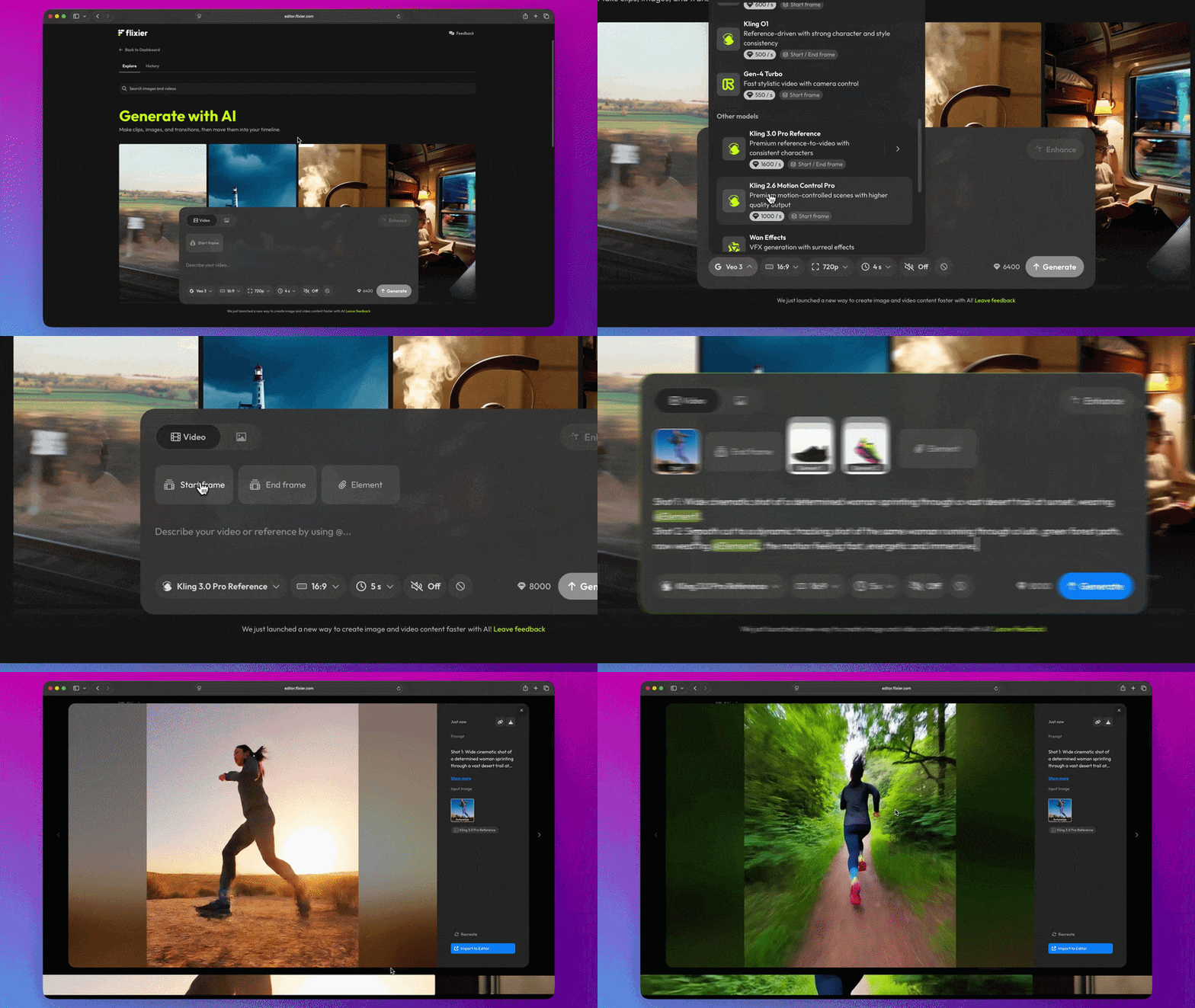
Here’s how it works:
Generate up to two distinct shots for each video
With Kling 3.0 Reference, you can now have two distinct shots in each video. Just make sure to specify “First shot:” and “Second shot:” when prompting.
Reference distinct elements in your prompts
On top of the start and and end frame references, this new model also allows you to upload reference images for up to three distinct elements you want generated. These ‘elements’ can be anything from characters, objects, or articles of clothing that appear in your video.
Click the Element button to create a new one, upload a photo for it, then reference it in your prompt with @Element1.
You can upload up to three distinct reference images for each element to ensure accurate generation from different angles!
You can try it out for yourself right now by selecting the Kling 3.0 Reference model when generating a video!
finished videos
